Free plan · No card needed

Set it up today.
Get booked tonight.

Cyntree gives you a booking page that takes appointments while you work, collects the deposit up front, and reminds everyone so they turn up. Start the account here — the app does the setup.

01 Create your account~30 sec

Free, and yours in half a minute

Create free account

Sign up with email, Google, or Apple. No card, no setup fee, no sales call.

then
02 Open the appiOS & Android

Add services, hours, and go live

Scan to open Cyntree on the App Store

Point your phone camera at the code to install Cyntree.

Already with us? Sign in · Curious about cost? See pricing

By creating an account you agree to our Terms and Privacy Policy.

The Cyntree app home screen: quick actions for a new booking, clients, help, messages and team, today's appointment marked paid, and the services overview.
Paid at bookingDeposit cleared before the slot
Your own QR codeChair-side, window, or bio
Payments by StripeCard details never touch us
Built in the UKGDPR-first by design
No contractMonthly plans, cancel anytime
iOS and AndroidRun the day from your phone

What happens next

From nothing to taking bookings

No migration, no onboarding call, no data import. Three moves and your page is live — and these are the actual screens you’ll be looking at.

  1. About 30 seconds

    Create your account

    Email, Google or Apple. No card, no setup fee, nothing to install first. You land in your workspace straight away.

    The Cyntree app home screen showing quick actions, the next appointment, services, and calendar availability.
  2. A few minutes

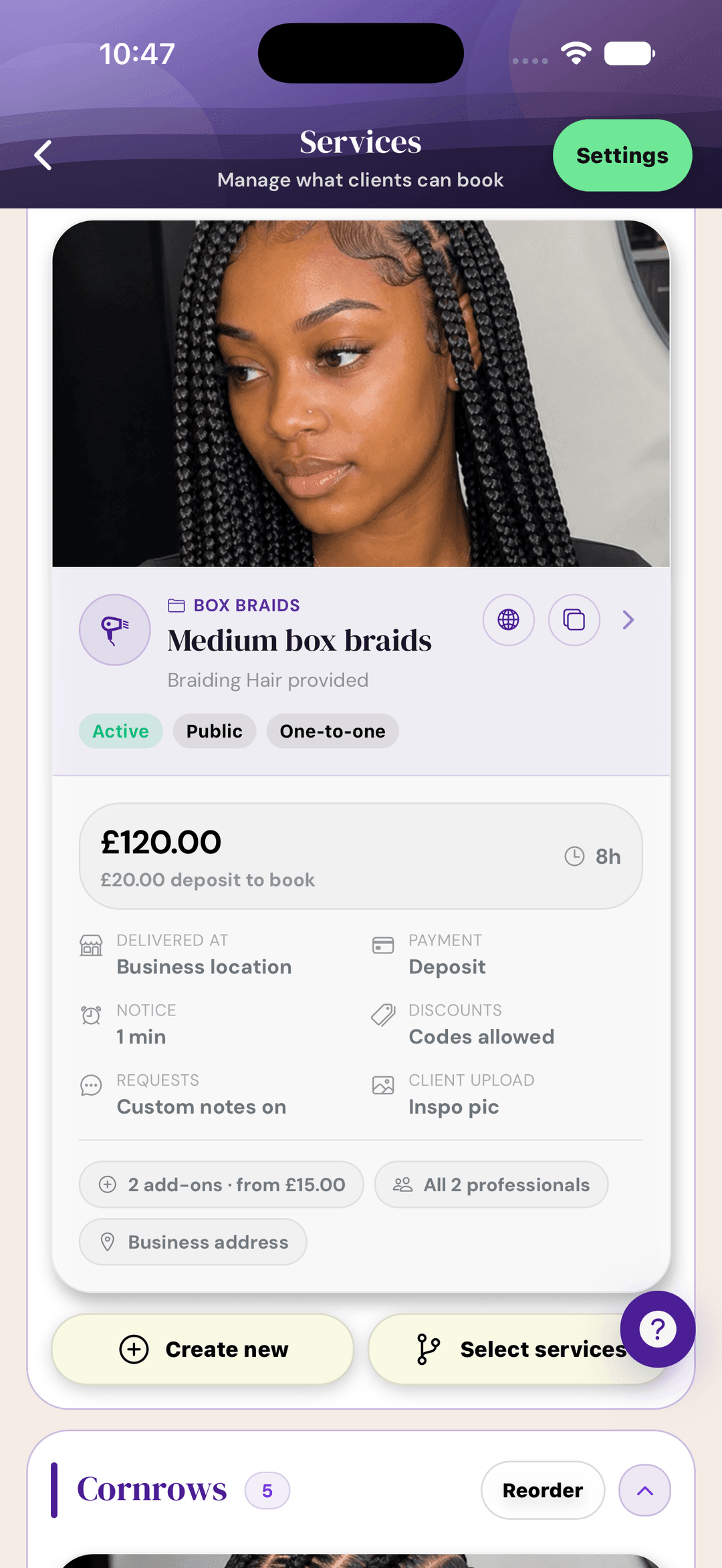
    Add your services and hours

    Name, price, duration, and whether the slot needs a deposit. Set your working hours once and the calendar handles the rest.

    The Cyntree services screen showing a service with its price, deposit, duration, delivery location, add-ons, and the professionals who can deliver it.
  3. Then you're live

    Share your link and get booked

    Your booking page goes live with your branding, ready for your bio, your QR code, or a text to a regular. Bookings land in the app.

    A live Cyntree booking page for a beauty business, showing the business name, location, and service count.

What you’re getting

The admin, handled

Cyntree is the bit between “someone wants an appointment” and “the money is in your account” — the back and forth, the deposit, the reminder, and the record of all of it.

Get paid before they sit down

Take a deposit or the full amount at the moment of booking, straight through Stripe. The slot is only held once the money clears — which is what actually stops the 9am ghost.

  • Deposit, full payment, or pay-on-the-day
  • Set the rule per service
  • Payouts to your own bank account
  • Refunds and cancellations tracked
Eyelash extensions · 90 minExample
Booked online, 22:14£45.00
Deposit taken to hold the slot£15.00
Balance on the day£30.00

Reminders that cut no-shows

Automatic confirmations and reminders go out before every appointment, so nobody forgets and you stop chasing.

Email on every plan · SMS from Pro

Catch the fully-booked enquiries

When there's no slot free, clients send a request with the time they want instead of drifting to someone else.

Pro and above

A page that looks hired-out

Your booking page carries your name, colours, photos, and services from day one — no designer, no domain admin.

Website builder on Premium

Know where the money comes from

Revenue, repeat clients, quiet hours, and your best services — reported without you keeping a spreadsheet.

Reports from Pro

Everything in your pocket

Rebook a client, block a morning off, message someone, or send an invoice between appointments.

No surprise at the end

Start free. Move up when it pays for itself.

Compare every plan

Starter

Freeforever

Your booking page, Stripe payments, email reminders, and up to 30 bookings a month.

Pro

£12/month

Unlimited bookings, SMS reminders, booking requests, and reports.

Teams

£29.99/month

The whole team on one flat price, five roles, and earnings reporting.

Before you start

The questions everyone asks

Do I need a card to start?

No. Creating your account and running on Cyntree Starter costs nothing and asks for no card. Card details are only needed when you move to a paid plan or start the Premium free month, and Stripe handles them — we never see the number.

What do I actually get for free?

Cyntree Starter is free permanently: your booking page, up to 30 bookings a month, Stripe payments, and email confirmations and reminders. Paid plans start at £12 a month when you outgrow it.

Can I take bookings without taking payment?

Yes, and you can mix it. Set each service to no payment, a deposit, or full payment up front — a consultation can be free while a four-hour appointment takes a deposit.

Do my clients need to download anything?

No. They open your link, pick a service and a time, enter their details, and confirm. No app, no account, no password.

Why do I need the app as well as the account?

Business setup — services, hours, payments, your live page — happens in the Cyntree app for iOS and Android, and that's where new bookings arrive. Your account, plan, and dashboard are available on the web too.

What happens if I cancel?

Plans are monthly and you can cancel whenever you like. Paid-only features switch off when access ends, but your main booking page stays online so your clients can still reach you.
Something else on your mind? Talk to us

Premium free for your first month

Your next client could book tonight

Create the account now, install the app when you have ten quiet minutes, and put the link in your bio before you close up.

Create free account
and get the app
Scan to open Cyntree on the App Store

Point your phone camera at the code to install Cyntree.

The free plan needs no card. The Premium free month is set up through Stripe when you choose it, and you can cancel before it ends — see pricing.